InviteBatch team
In this guide
- 1Where can you print Canva wedding invitations in the UK?
- 2How do you download wedding invitations from Canva for printing?
- 3PDF, PNG or JPG: which should you upload?
- 4What size should your Canva design be?
- 5How do you upload a Canva invitation to InviteBatch?
- 6Which paper and finish can you choose?
- 7Front only or double-sided?
- 8How many invitations should you order?
- 9Are envelopes included?
- 10What do bleed, trim and safe margin mean?
- 11How do you check image resolution and avoid blurry prints?
- 12A printable Canva PDF checklist: how to check your file before ordering
- 13What does it cost, delivered?
- 14How much does delivery cost, and where do you deliver?
- 15What happens after you place your order?
- 16What do customers say?
- 17What if there is a problem with your file?
- 18Can you use an Etsy invitation design?
- 19Which option should you choose?
- 20Related guides
The short answer: you can get Canva wedding invitations printed in the UK by downloading your design from Canva as a PDF Print and uploading it to an online printer (or ordering through Canva's own print service). At InviteBatch you upload the finished PDF, PNG or JPG, choose card, quantity and envelopes, and see the delivered price before you pay, from 1 invitation. Printing takes 1 to 3 working days, then it is posted to you.
Already designed your wedding invitations in Canva?
Upload your finished PDF, PNG or JPG to InviteBatch. Choose your card, quantity and envelopes, then see your delivered price before paying.
From 1 invitation
Upload your Canva invitation →This guide is for people who already have a design and need to know where to print it, what file to send and what it will cost. It is a buying guide, not a Canva tutorial. If you want a general walkthrough of every way to print from Canva, read how to print from Canva. Our main order page for this is print your Canva invitations.
Where can you print Canva wedding invitations in the UK?
There are four routes. Which is best depends on how many you need, how thick you want the card, and how fast you need them.
| Printing option | What to consider |
|---|---|
| Home printer | Ink and cardstock cost, borderless printing (most home printers cannot print to the edge), cutting each card, and thick card jamming. Fine for 1 to 10 cards. |
| Local print shop | Paper options, setup fees, collection instead of delivery, and some shops ask for proof you may print a template. Good for a same-week job. |
| Online printing service | Upload your file, see a preview, choose paper and envelopes, delivery to your door. Compare the delivered total, not the headline price per card. |
| Specialist wedding printer or stationer | Foil, letterpress, bespoke paper and design help. Higher cost and longer lead times. See our wedding invitation printing cost guide for the ranges. |
Canva itself also prints. Canva's UK invitations page says you can print wedding invitations from the editor and choose finish, size and matching envelopes (Canva UK invitations). We have not compared Canva's UK prices with ours, because we could not find a UK price list we could verify. Get a delivered total from each option for your size and quantity and compare them side by side. We do not claim InviteBatch is the cheapest.
How do you download wedding invitations from Canva for printing?
- Open your design in Canva.
- Click Share, then Download.
- Set the file type to PDF Print.
- Tick Crop marks and bleed if you see it, then click Download.
- If your invitation has a back, make sure both pages are in the PDF (page 1 front, page 2 back).
That is Canva's own process. The menu can say File instead of Share in some versions of the editor, so follow what your screen shows. Canva's guidance on margins, bleed and crop marks is here: Canva help: margins, bleed and crop marks. Canva also says to check your printer's own requirements, because printers may trim differently.
PDF, PNG or JPG: which should you upload?
PDF Print is the best choice. Text and shapes stay sharp at any size, and a two-page PDF gives you front and back. PNG and JPG also work at InviteBatch, but a small image stretched to fill the card will print blurry, so only use them if the file is large. Our studio shows the print sharpness as soon as you upload, and warns you about low resolution before you pay.
What size should your Canva design be?
Set the size before you design, because resizing later can push text towards the edge.
| Card you will order | Canva size to use | Card size |
|---|---|---|
| 7×5 inch (classic wedding invitation) | 5×7 in, portrait or landscape | 178×127 mm |
| 6×4 inch (postcard size) | 4×6 in, portrait or landscape | 152×102 mm |
| Square | Square design | 5.8×5.8 in (147×147 mm) |
Other shapes still work at InviteBatch. Choose Whole design to fit it on white, or Fill to edge to trim it to the card.
How do you upload a Canva invitation to InviteBatch?
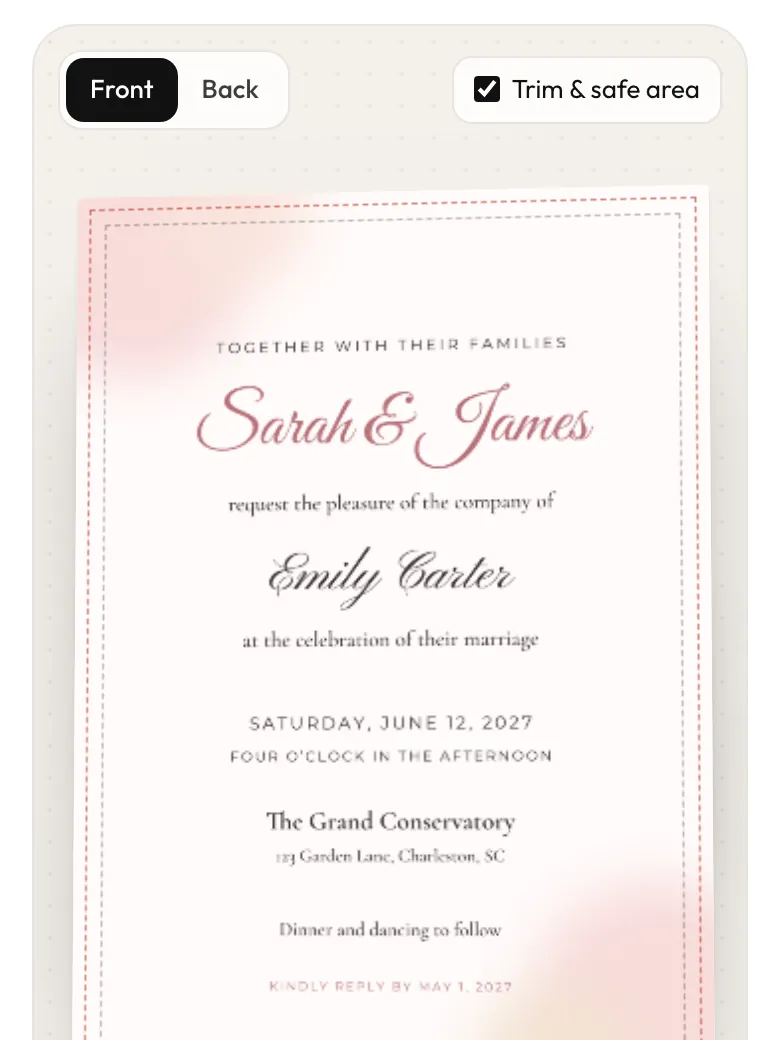
- Upload. Open the Canva print page and tap Upload your design. Your invitation appears on a real-size card with the trim line and safe area shown, so you see what will be printed.
- Choose. Pick the size, how many cards (1 to 300), one or both sides, matte or gloss card, and envelopes or not. The price updates with every choice.
- Check and pay. Add your email and delivery address, pick a delivery option (each shows its price and expected arrival date), tick to confirm your design is correct and pay by card, Apple Pay, Google Pay or PayPal. No account is needed.
- We print. Printing takes 1 to 3 working days. Your order number is shown on screen and emailed to you, and tracked deliveries get a tracking link when they ship.
Already designed your wedding invitations in Canva?
Upload your finished PDF, PNG or JPG to InviteBatch. Choose your card, quantity and envelopes, then see your delivered price before paying.
From 1 invitation
Upload your Canva invitation →Which paper and finish can you choose?
| Card | Paper | Finish | Envelope |
|---|---|---|---|
| 7×5 inch premium matte | 324gsm recycled Mohawk card | Matte | Brown Kraft, optional |
| 7×5 inch gloss | 280gsm card | Gloss | Brown Kraft, optional |
| 6×4 inch matte or gloss | 324gsm matte or 280gsm gloss | Matte or gloss | Brown Kraft, optional |
| Square 5.8×5.8 inch | 400gsm thick gloss card | Gloss | Included |
Gsm means grams per square metre. Ordinary printer paper is about 80gsm, so the 324gsm and 400gsm cards feel several times thicker. Matte has no shine and suits a soft, classic look. Gloss makes colours look stronger.
Front only or double-sided?
Both. At InviteBatch, printing both sides costs the same as one side. Use the back for directions, a timeline or a QR code. See QR code wedding invitations if you want guests to RSVP online. In Canva, add a second page for the back and download both pages in one PDF.
How many invitations should you order?
Order one per household, not one per guest, plus a few spares for keepsakes and late additions. A guest list of 100 is often 50 to 60 invitations. Our guide to how many wedding invitations to order goes through it. You can order any number from 1 to 300.
Are envelopes included?
You choose. At InviteBatch, 7×5 inch and 6×4 inch cards come with or without a brown Kraft envelope for each card, and square cards always include one. The prices below include envelopes.
What do bleed, trim and safe margin mean?
- Trim is where the card is cut to its final size.
- Bleed is background colour or image that runs a little past the trim, so a slightly off cut does not leave a white edge. Canva adds it when you tick Crop marks and bleed.
- Safe margin is the area inside the trim where text is safe. Keep names, dates and the venue at least 5 mm inside the edge.
At InviteBatch the bleed is 0.1 inch (2.5 mm) on 7×5 and 6×4 inch cards and 0.05 inch on square cards. If your design has no bleed, choose Fill to edge and we enlarge it very slightly so there is no white edge after trimming. Crop marks in the PDF are ignored.
How do you check image resolution and avoid blurry prints?
- Use PDF Print where you can, so text stays sharp.
- Use photos and graphics at their full size. A small image stretched to fill the card prints blurry.
- For a PNG or JPG, aim for about 300 dpi at card size. A 7×5 inch card with bleed is roughly 2,160 × 1,560 pixels at 300 dpi.
- Look at the sharpness note after you upload. Our check warns about low-resolution images before you pay.
- Avoid very pale text on a pale background, and remember that very dark designs print slightly darker than they glow on screen.
A printable Canva PDF checklist: how to check your file before ordering
- Design size matches the card (5×7 in, 4×6 in or square).
- Downloaded as PDF Print with Crop marks and bleed ticked if offered.
- Back page is page 2 of the same PDF, if you want a double-sided card.
- Names, dates and the venue are at least 5 mm inside the edge.
- The weekday matches the date. "Saturday 14 June 2027" is a Monday, and our check flags it.
- No leftover template text such as [Name] or Lorem ipsum, which our check also flags.
- Photos are large enough and not stretched.
- Spelling checked by one other person.
- Phone screenshot? Our studio trims status bars and hairlines, but upload the PDF if you can.
- One test card ordered before the full run, if the date is not urgent.
What does it cost, delivered?
These are real InviteBatch totals for the UK, with envelopes, VAT and the cheapest delivery included, checked on 24 November 2026. The price shown for you at checkout is the price you pay, in pounds for UK visitors.
| Cards | Square 5.8×5.8″ | 6×4″ gloss | 7×5″ gloss | 7×5″ premium matte |
|---|---|---|---|---|
| 1 | £9.79 | £13.14 | £14.14 | £15.24 |
| 20 | £37.10 | £54.45 | £72.85 | £88.45 |
| 50 | £85.80 | £99.15 | £162.15 | £197.65 |
| 100 | £165.30 | £176.65 | £284.65 | £363.65 |
For other quantities, such as 60 cards, the print page shows the exact total before you pay. For wider context on what other options cost, see our wedding invitation printing cost guide and how much it costs to print invitations in the UK.
Ordering one card: a single card is the most expensive per card, because the print and the postage are the same cost for one as for many. It is still useful: you see the colours, the paper and the trim before you commit to 60.
Bulk: the price per card drops up to about 100 cards and then levels off, so ordering far more than you need does not save much.
How much does delivery cost, and where do you deliver?
Printing takes 1 to 3 working days. After that, your delivery choice applies, and every option shows its price and expected arrival date before you pay. For example, for 50 cards of 7×5 inch premium matte: economy post £2.65, standard post £3.60, tracked courier £23.10 and next-day courier £44.30. A next-day courier arrives the next working day after dispatch, not the day after you order. See our shipping page for every country.
We deliver to the UK, USA, Canada and 13 EU countries (Ireland, France, Germany, the Netherlands, Belgium, Luxembourg, Austria, Denmark, Sweden, Finland, Italy, Spain and Portugal). US orders go by DHL Express and usually take 2 to 4 working days after dispatch. Import taxes may be due on some deliveries to Canada and the EU. Premium matte cards to the EU are printed in the Netherlands with VAT included.
What happens after you place your order?
- You see an order number on screen and get an email receipt.
- We print your cards in 1 to 3 working days, exactly as the design you approved.
- Your order goes out with the delivery you chose, and tracked deliveries get a tracking link.
- If a card arrives damaged or misprinted, send us a photo within 14 days and we reprint the affected cards free, or refund them. We cannot refund typos that were in the approved file, which is why the checklist above matters.
Unpaid uploads are deleted after 5 hours. Details are on our refunds page.
What do customers say?
A verified customer who ordered two printed birthday invitations told us: "Order has now been received. They are lovely. Thank you so much." Read more on our reviews page. We do not yet have a wedding-specific review to quote, so we are not showing one.
What if there is a problem with your file?
Email support@invitebatch.com with your order number or a description and, if you can, the file. We will tell you what to change, such as the page size, bleed or a low-resolution image, and the studio will flag most issues before you pay.
Can you use an Etsy invitation design?
Yes. An Etsy invitation is usually a Canva or Templett template. Edit it, download the print PDF at the size you need and upload it the same way. Check the seller's licence allows printing at a print shop. More on this in our Etsy download printing guide.
Which option should you choose?
- 1 to 10 cards, no rush: a home printer or one test card online.
- 20 to 150 cards, own design: an online printer that shows the delivered total before you pay.
- Same-week job: a local print shop.
- Foil, letterpress or bespoke design: a specialist wedding stationer.
Already designed your wedding invitations in Canva?
Upload your finished PDF, PNG or JPG to InviteBatch. Choose your card, quantity and envelopes, then see your delivered price before paying.
From 1 invitation
Upload your Canva invitation →Related guides
- How to print from Canva
- Wedding invitation printing cost in the UK
- Can you order just 10 or 20 wedding invitations?
- Personalised printed invitations from your own design
- More guides on the InviteBatch blog
Prices and delivery options were checked on 24 November 2026 and include UK VAT. Canva's instructions are linked above and may change. Published 24 November 2026 by the InviteBatch team.