 InviteBatch team
In this guide
- 1What should a wedding RSVP template include?
- 2What are the main types of wedding RSVP templates?
- 3What does a printable wedding RSVP card template look like?
- 4What size should a wedding RSVP card be?
- 5What questions belong on an online wedding RSVP form?
- 6How do you handle plus-ones, kids and extra guests on the RSVP?
- 7How do you collect RSVPs for a rehearsal dinner, welcome party or brunch?
- 8How do you make wedding RSVP templates with InviteBatch, step by step?
- 9How do you track wedding RSVPs once replies come in?
- 10Should you use RSVP cards, a wedding website or both?
- 11Are free wedding RSVP templates worth it?
- 12What does RSVP mean on a wedding card?
- 13When should RSVP cards be sent and returned?
- 14What are the most common wedding RSVP template mistakes?
- 15What is included when you order on InviteBatch?
The short answer: a good wedding RSVP template has four parts: a reply-by date, the guest's name, accept or decline for each event, and how many people are coming. You can print it as an RSVP card, send it as an online RSVP form, or do both with a small QR card that opens a personal RSVP page. On InviteBatch you design the invitation once, paste your guest list, and every guest gets a named invitation, a matching RSVP card with their own QR code, and an online RSVP form that fills in your guest list for you.
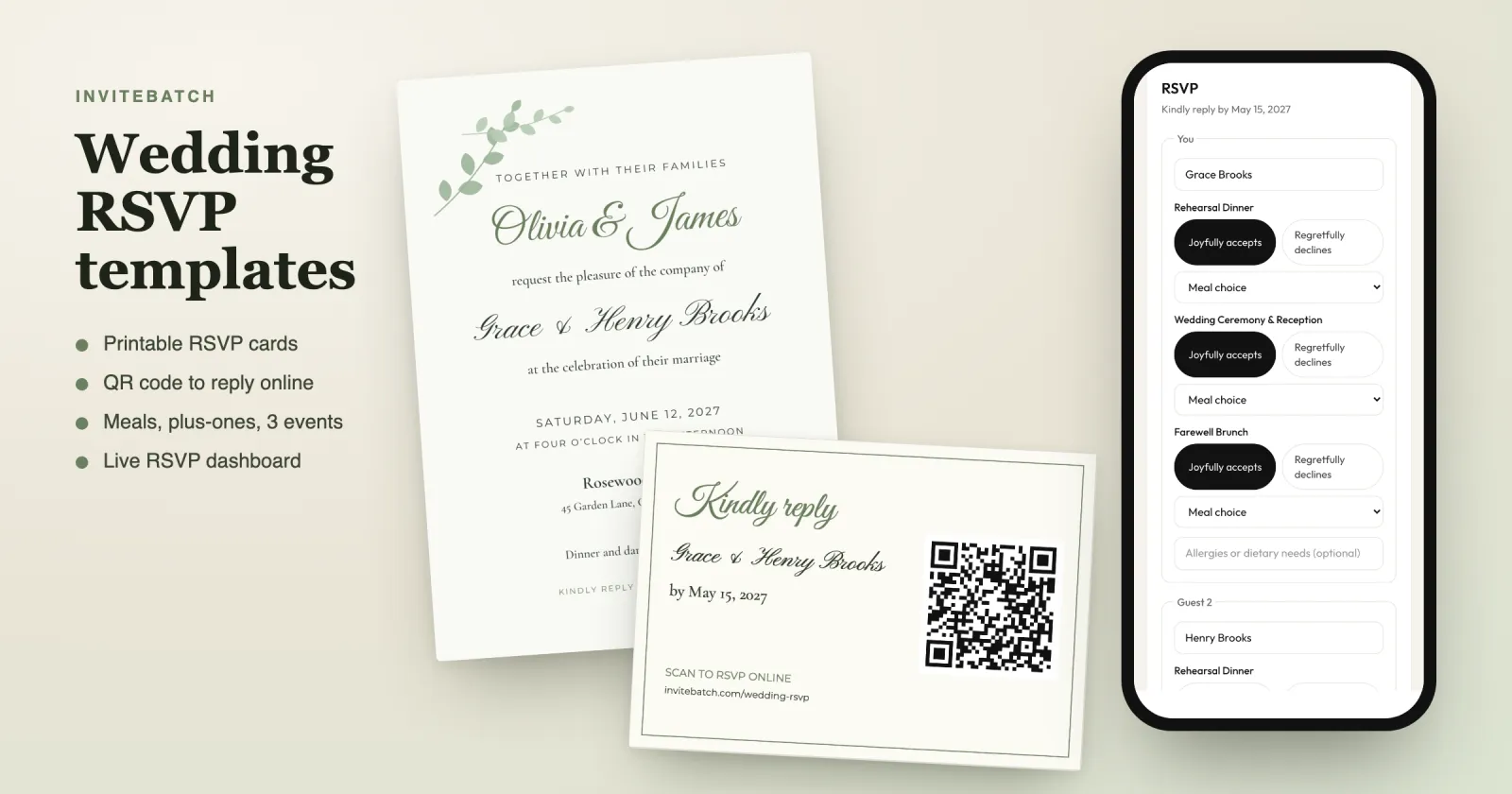
This guide covers every kind of wedding RSVP template couples use in 2027: printable RSVP cards, online RSVP forms, QR code cards and a wedding RSVP website. For each one you will see what to include, the right size, what it costs and how to track every reply without a messy spreadsheet. All screenshots are from a real InviteBatch order made with sample names.
What should a wedding RSVP template include?
Every wedding RSVP template, printed or online, needs the same core details. Leave one out and you will be texting guests in May.
- Reply-by date. Usually three to four weeks before the wedding, so you can send final numbers to your caterer. Our guide to the wedding RSVP deadline explains how to choose it.
- Guest name. Pre-printed is best. A blank "M______" line works on traditional cards, but people forget to fill it in.
- Accept or decline. "Joyfully accepts" and "Regretfully declines" are the classic pair.
- Number attending. Either a blank, or the number of seats you saved: "We have reserved 2 seats in your honor."
- Each event. If you have a rehearsal dinner, welcome drinks or a brunch, guests need to answer for each one separately.
Add these only if you need them:
- Meal choice for a plated dinner (for example beef, chicken or a vegetarian option).
- Allergies or dietary needs as a free-text line.
- A song request or a short question of your own.
- Contact details such as an email address for updates, or a mailing address for thank-you cards.
Keep the card short. Every extra question is one more reason for a guest to put the card aside "for later".
What are the main types of wedding RSVP templates?
There are four ways to collect wedding RSVPs. Most couples in 2027 use a mix: paper for the look, online for the replies.
| Type | How guests reply | Best for | Downsides |
|---|---|---|---|
| Printable RSVP card + envelope | Fill in the card and mail it back | Very traditional weddings, older guests | Postage both ways, slow, replies typed up by hand |
| QR code RSVP card | Scan the code, reply on their phone | Couples who want paper and easy tracking | Needs a personal link per guest to work well |
| Online RSVP form or link | Open the link from a text, email or WhatsApp | Digital invitations, destination weddings | A shared public form lets anyone reply for anyone |
| Wedding RSVP website | Find their name on your wedding site | Big weddings with lots of information | More set-up, guests must search for their name |
The best mix for most weddings is a printed invitation with a QR RSVP card, backed by a personal online RSVP link you can also send by text. That is exactly what an InviteBatch order includes.
What does a printable wedding RSVP card template look like?
A printable wedding RSVP card is a small card that goes inside the invitation envelope. The traditional version has a reply-by date, a name line, accept and decline options and, often, meal choices. Guests fill it in and mail it back in a stamped return envelope.
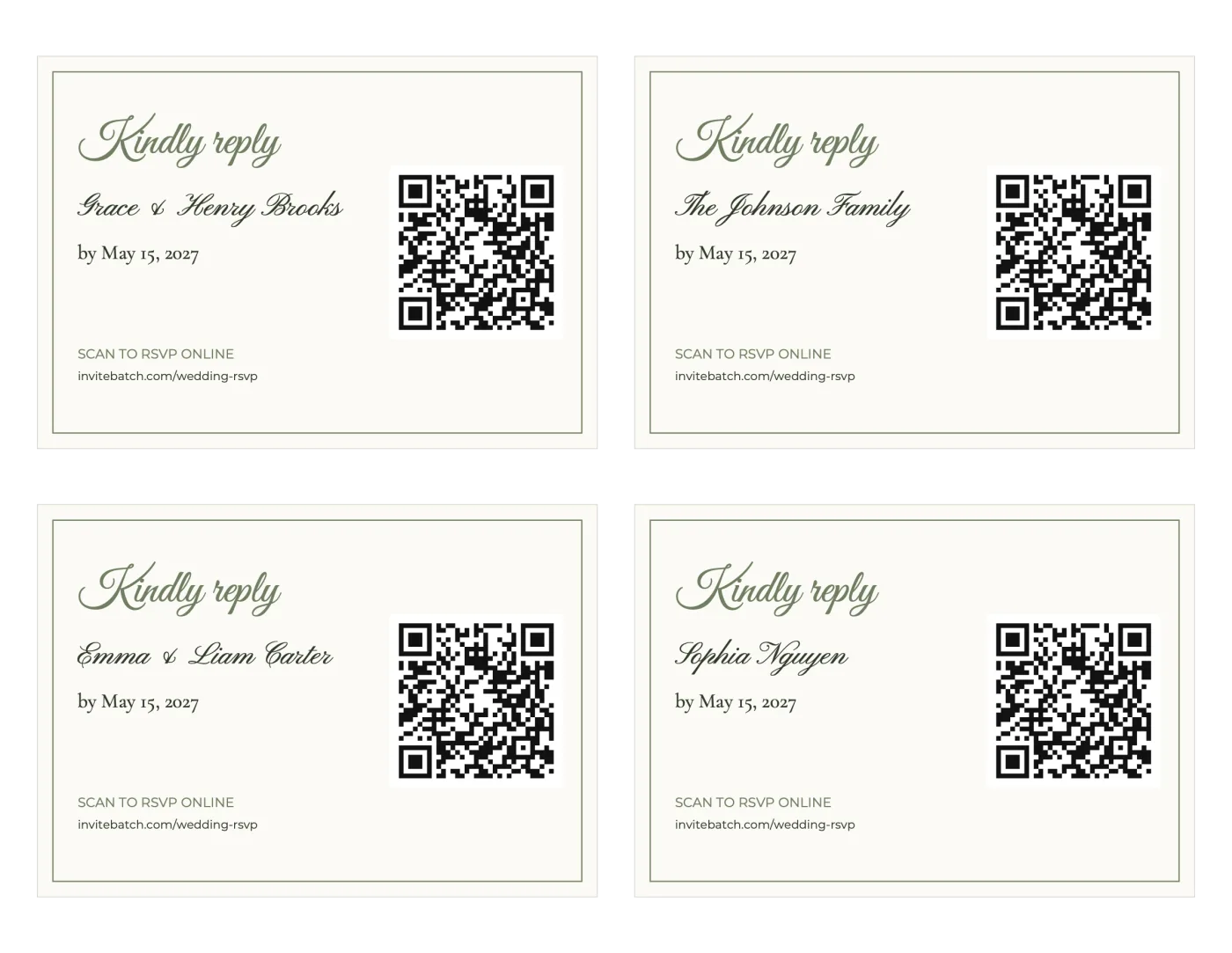
The modern version replaces the tick boxes with a QR code. Here is what an InviteBatch RSVP card sheet looks like. Each card carries the guest's own name and their own QR code, so a scan opens their RSVP page, already filled in with their party:
Why the QR version wins for most couples:
- No return envelopes or stamps. Guests reply from their phone in less time than it takes to find a stamp.
- No reading handwriting. Names, meals and allergies arrive typed.
- No lost cards. Every reply lands in your dashboard the moment it is sent.
- It still looks like a real wedding suite. The card uses the same colors and name font as your invitation.
If you want a fully traditional fill-in card, use our wedding RSVP wording examples. They include formal, casual, meal choice and adults-only versions you can copy onto any card.
What size should a wedding RSVP card be?
The standard US wedding RSVP card is 3.5 x 5 inches, which fits a 4bar (A1) envelope. In the UK, reply cards are often A6 (105 x 148 mm) or 127 x 89 mm. Here are the common sizes side by side:
| RSVP card size | Inches | Millimeters | Envelope | Notes |
|---|---|---|---|---|
| Standard US reply card | 3.5 x 5 | 89 x 127 | 4bar / A1 (3.625 x 5.125 in) | The most common size |
| InviteBatch QR RSVP card | 5 x 3.5 (landscape) | 127 x 89 | Tucked inside the A7 invitation envelope | Four per US Letter or A4 sheet |
| A6 / 4x6 card | 4.1 x 5.8 or 4 x 6 | 105 x 148 or 102 x 152 | C6 or A6 | Popular in the UK, also used as postcards |
| RSVP postcard | 4.25 x 6 | 108 x 152 | None (mailed as a postcard) | Saves the return envelope |
Whatever size you choose, the RSVP card must be smaller than your invitation so it sits neatly in front of it. A 5x7 invitation and a 3.5 x 5 card is the classic pairing, and both fit in one A7 envelope. More on paper and envelopes in our guide to printable 5x7 wedding invitations.
What questions belong on an online wedding RSVP form?
An online RSVP form can ask more than a paper card, but the same rule applies: only ask what you will actually use. These are the questions that earn their place:
- Is each person coming? One answer per person, per event. Not one answer per household.
- Meal choice, if dinner is plated. Show it only to people who said yes.
- Allergies or dietary needs, as free text.
- Up to three questions of your own. Good ones: "Which song will get you on the dance floor?", "Will you need the shuttle from the hotel?", "Are you staying at the room block?"
- A message for the couple. Optional, and guests love it.
- An email address, optional, so you can send updates or a reminder.
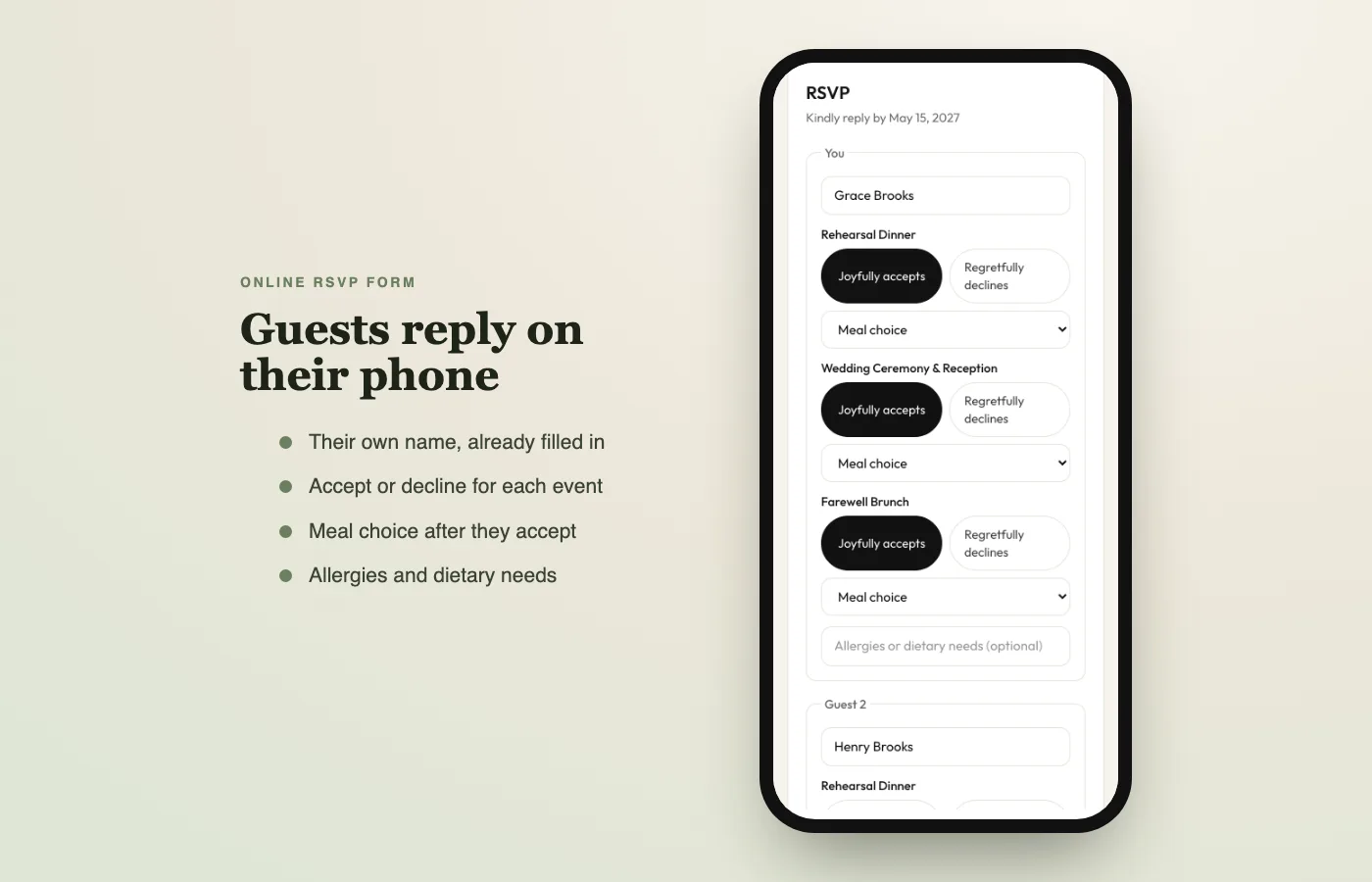
Here is the InviteBatch online RSVP form on a phone. The guest sees their own name, answers for each event, and the meal choice appears only after they accept:
A shared Google Form can collect the same answers for free. The problem is that it is public: anyone with the link can reply, for anyone, as many times as they like, and you have to match "Jen + 1" to the right row of your guest list yourself. A personal link per invitation avoids all of that.
How do you handle plus-ones, kids and extra guests on the RSVP?
Most RSVP headaches come from the number of guests. A good template takes the guesswork away:
- Name every person you invite. "The Johnson Family" on the envelope, but Sarah, David and Mia on the RSVP.
- Set a seat count per invitation. A personal online RSVP shows exactly that many people, so a party of two cannot reply for four.
- For a plus-one, add a "Guest" slot. The guest types their partner's name, so your place cards and seating chart have a real name.
- For an adults-only wedding, address the invitation to the adults only and add a kind line on the RSVP. Wording for that is in our wedding RSVP wording guide.
How do you collect RSVPs for a rehearsal dinner, welcome party or brunch?
Put all your events on one RSVP and let guests answer each one separately. InviteBatch supports up to 3 events per wedding, for example:
- Friday: Rehearsal Dinner (family and wedding party only)
- Saturday: Wedding Ceremony & Reception (everyone)
- Sunday: Farewell Brunch (everyone)
After checkout you choose which guests are invited to each event. The rehearsal dinner only appears on the invitations of the people invited to it, so nobody sees an event they are not part of. Each event has its own totals and meal counts in your dashboard.
How do you make wedding RSVP templates with InviteBatch, step by step?
Here is the whole process, from blank page to RSVPs coming in. No design skills, no app to install and no account needed to start.
- Choose a wedding design. Browse the wedding invitation templates and open one in the editor.
- Write your invitation and RSVP details. Names, date, venue, and your reply-by line, for example "Kindly reply by May 15, 2027".
- Set up the RSVP form. Add meal choices, turn on the dietary question, write up to 3 questions of your own, and add up to 3 events.
- Paste your guest list. Copy it from Excel, Google Sheets, Notes or a WhatsApp chat, one invitation per line. Every line becomes its own named invitation and its own RSVP link.
- Preview every invitation free. Scroll through each card with the real guest names before you pay.
- Order once. $49.99 one-time for up to 1,000 invitations, with RSVP, RSVP cards, envelope addressing and thank-you cards included.
- Print and send. Download print-ready invitations and the RSVP card sheets, and send each guest their personal link by text, email or WhatsApp. You can also add a QR code to your wedding invitations themselves.
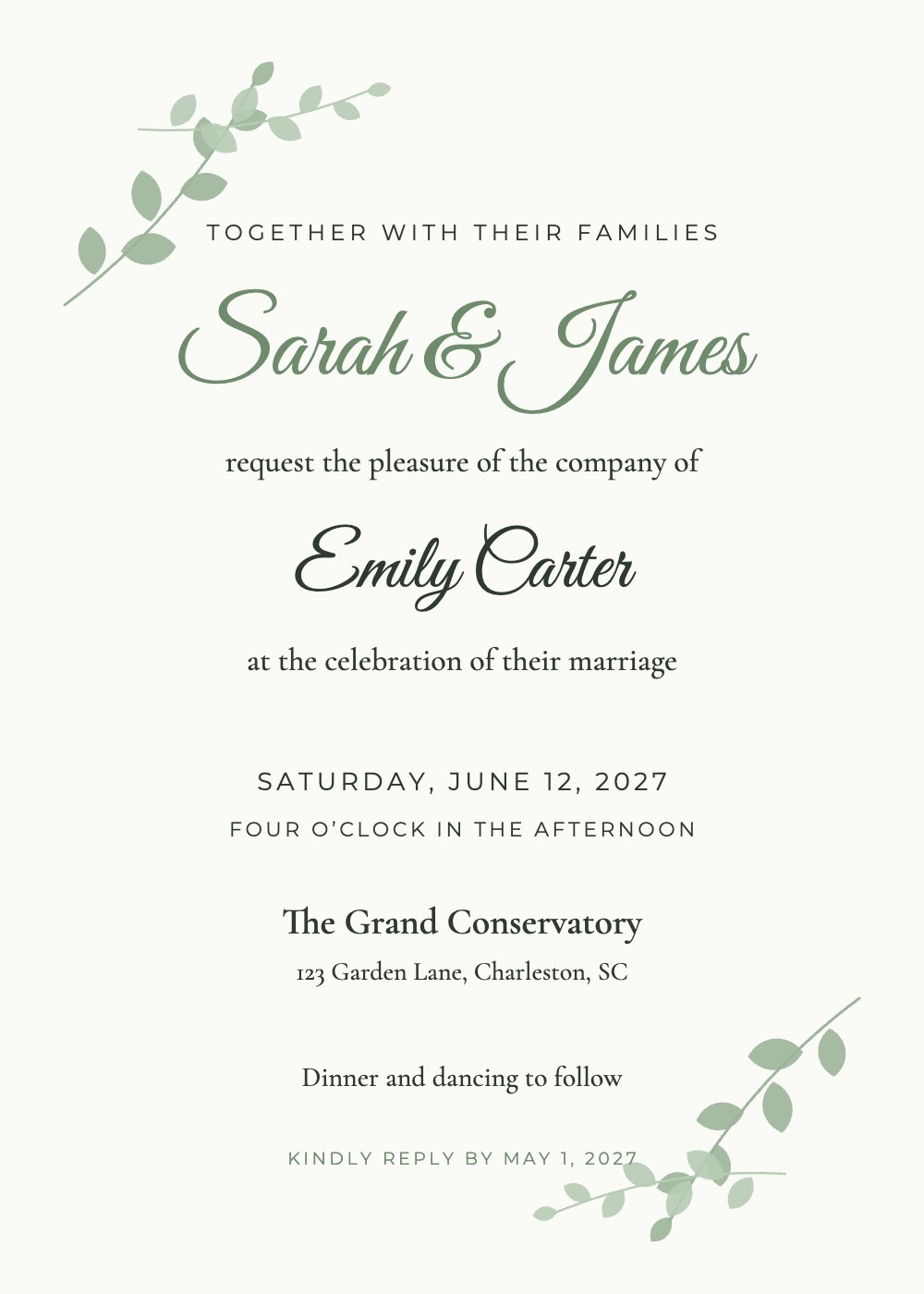
Sage Botanical
Wedding
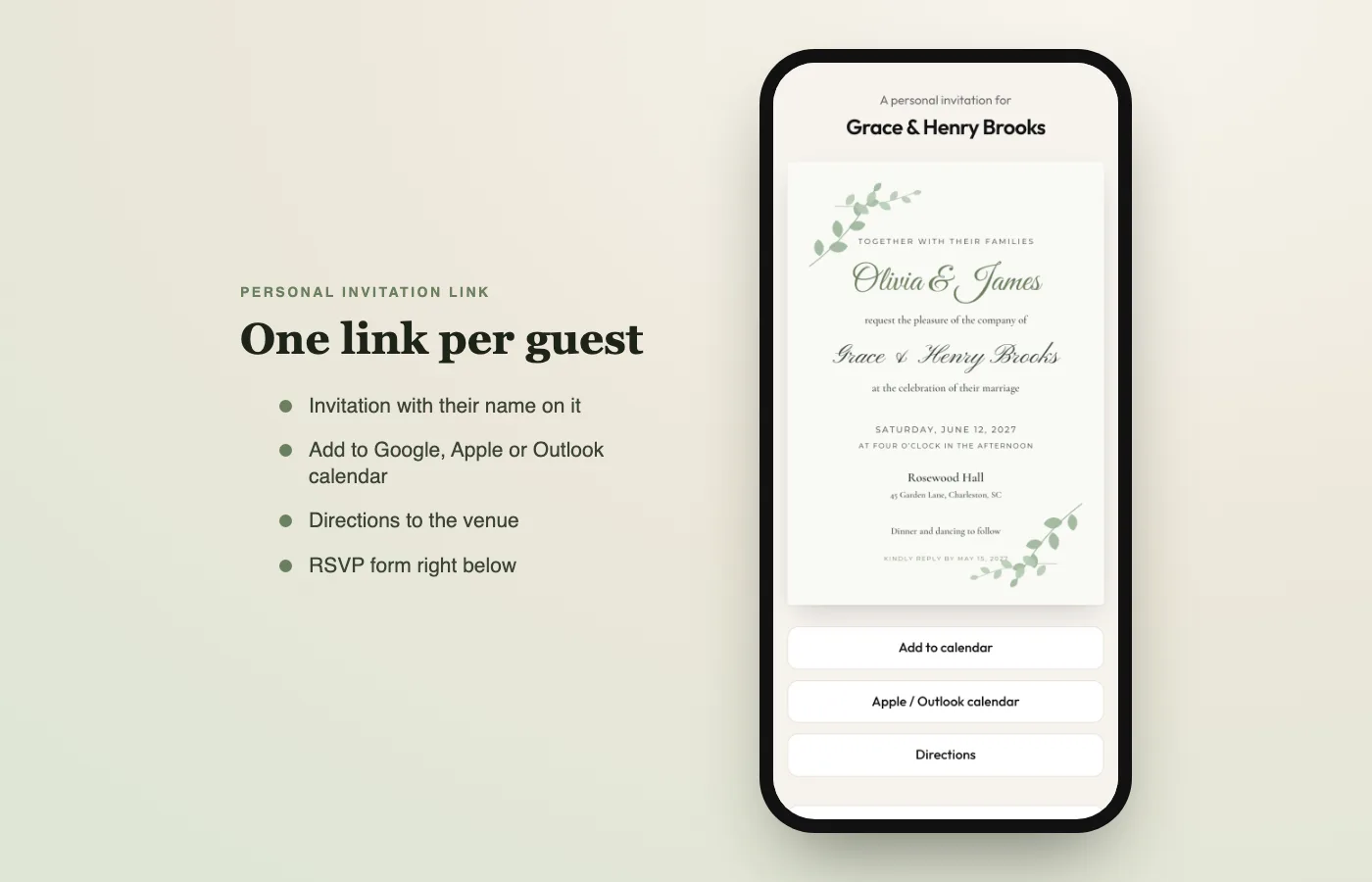
Every guest then receives an invitation with their own name on it, plus buttons to add the wedding to their calendar and get directions to the venue:
How do you track wedding RSVPs once replies come in?
Every reply lands in your RSVP dashboard automatically. No copying names from cards into a spreadsheet. The dashboard shows:
- Who is coming, who declined and who has not replied, per event.
- Meal counts for the caterer, ready to send.
- Dietary needs by name, so the kitchen knows who has the nut allergy.
- Who opened their invitation and whose RSVP card QR code was scanned.
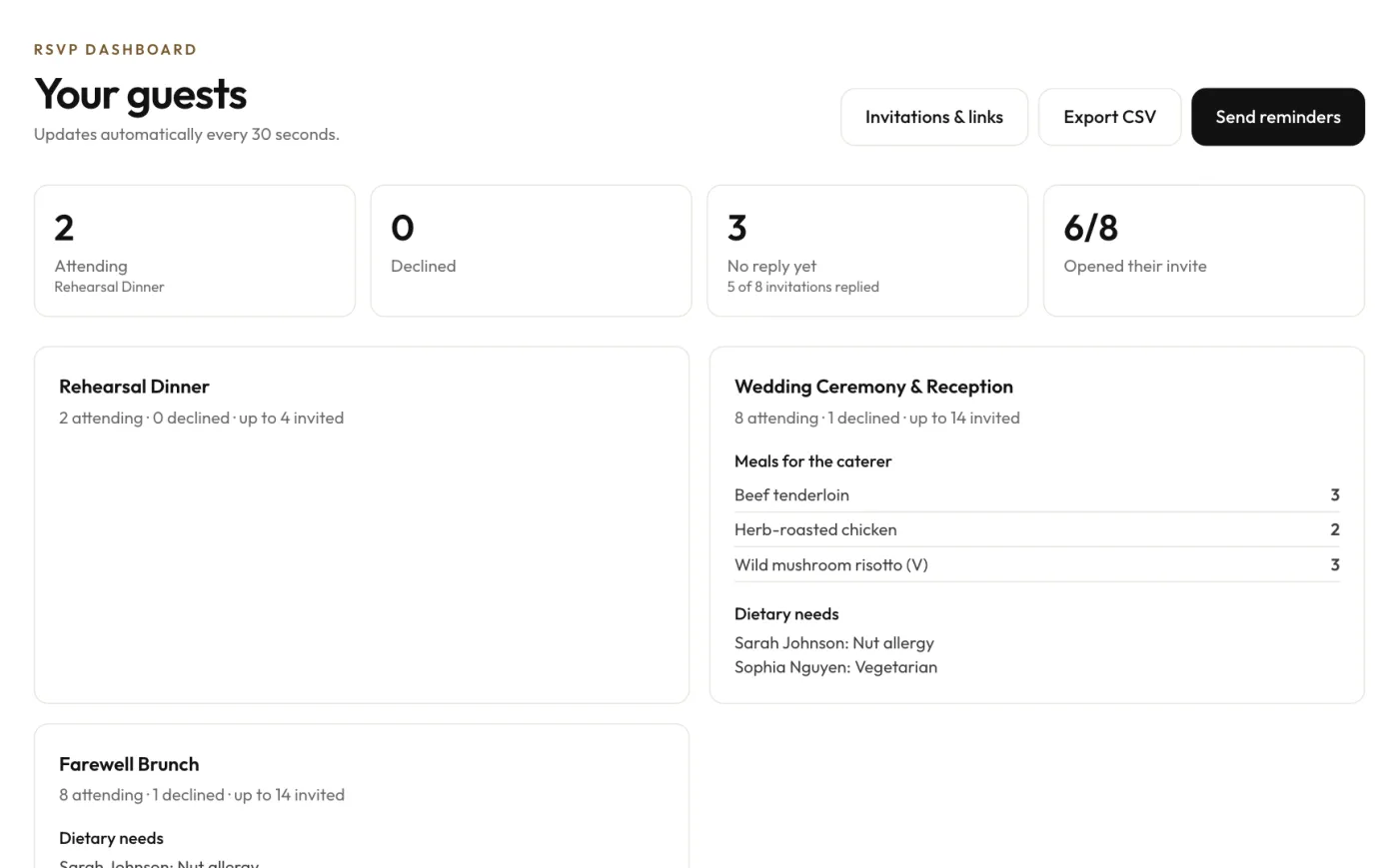
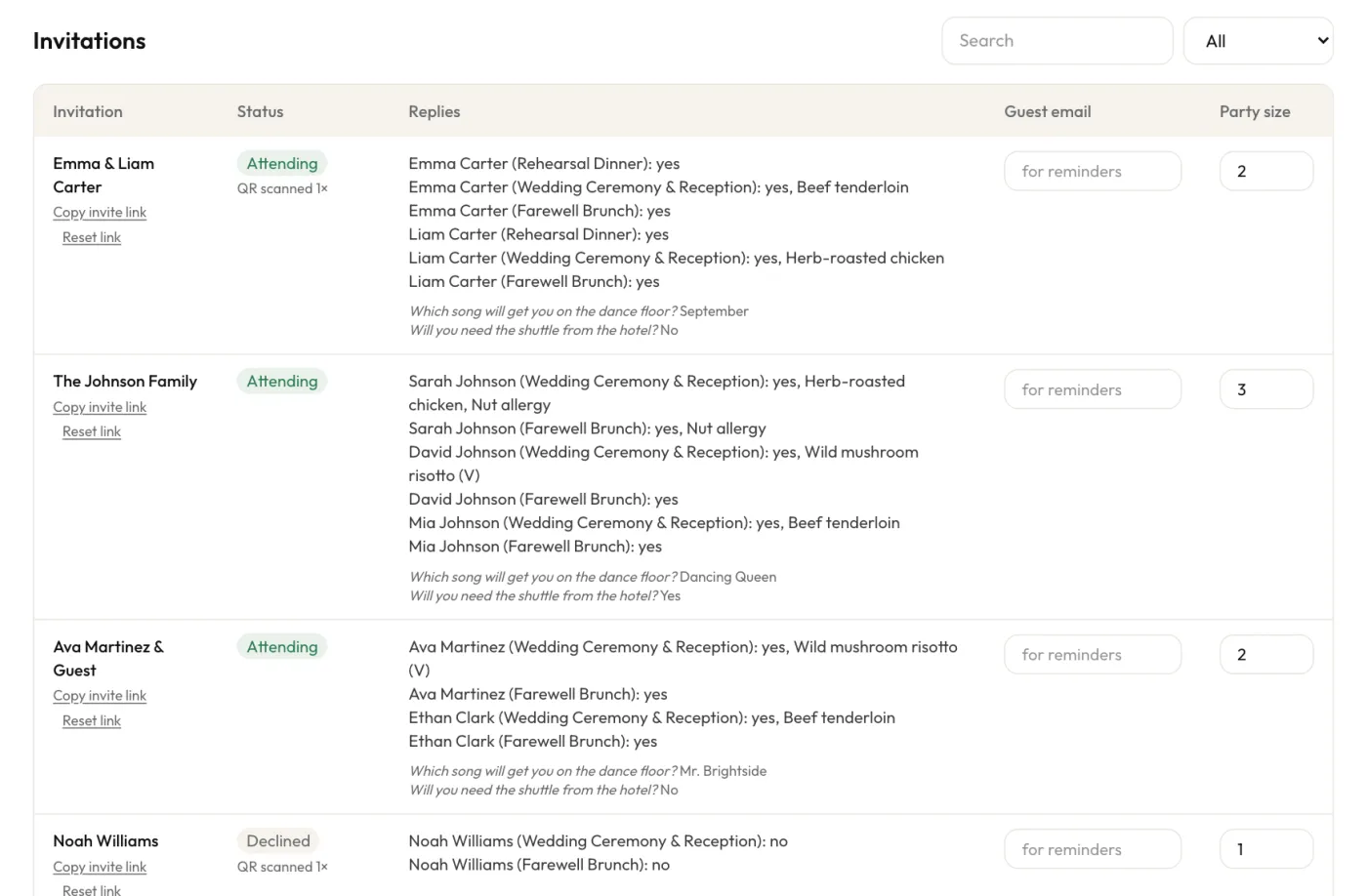
Below the totals, every invitation has its own row with each person's answers, meal and question replies:
Two buttons save the most time:
- Send reminders emails every guest who left an email address and has not replied yet. Send one a week before your deadline.
- Export CSV gives one row per person per event. Use it for the caterer's final numbers, place cards and your seating chart.
For more on tracking, see how to track wedding RSVPs online.
Should you use RSVP cards, a wedding website or both?
For most couples, both: a printed invitation with a QR RSVP card, plus a personal online link. Here is how to decide:
- Choose printed RSVP cards with return envelopes if the wedding is very formal and many guests are not comfortable with phones. Expect to chase some replies by phone.
- Choose QR RSVP cards if you want a real paper suite but easy tracking. This is the best fit for most weddings.
- Choose digital only if you are short on time or budget, or most guests live far away. Send digital wedding invitations with the RSVP built in.
- Add a wedding RSVP website if you have a lot of information to share: hotel blocks, travel, schedule, dress code, registry. Big free platforms such as Zola, The Knot and Minted include RSVP on their wedding websites (as of October 2026). Guests usually have to look themselves up by name, which works best when your invitations are not personalized.
Are free wedding RSVP templates worth it?
Free templates are fine for the design, but the real cost is your time. Here is what each free option really involves:
| Option | Cost | Personalized per guest? | Online replies? | Tracking |
|---|---|---|---|---|
| Canva / Adobe Express card | Free design, you print | No, edit each card yourself | No | Manual |
| Word or PDF template | Free, you print | No, edit each card yourself | No | Manual |
| Google Forms | Free | No, one shared form | Yes | Spreadsheet you clean up |
| Wedding website builder | Often free | Name lookup | Yes | Built in |
| InviteBatch | Free preview, $49.99 one-time | Yes, every invitation and RSVP card | Yes, personal link + QR | Built-in dashboard, reminders, CSV |
If you have 20 guests, a free Canva card and a Google Form are perfectly good. If you have 100 or more, editing 100 cards and matching 100 form replies to your list takes a full weekend. That is the job InviteBatch does in about two minutes.
What does RSVP mean on a wedding card?
RSVP stands for "répondez s'il vous plaît", French for "please reply". On a wedding card it means the couple needs your answer by the date shown, so they can plan food, seats and numbers. You should reply even if you cannot come. "Kindly reply", "Please respond" and "The favor of a reply is requested" all mean the same thing.
When should RSVP cards be sent and returned?
RSVP cards go out with the wedding invitations, six to eight weeks before the wedding. Set the reply-by date three to four weeks before the wedding. Send a reminder about a week before the deadline, then follow up with anyone still missing two to three days after it. Full timeline in our guide to when to send wedding invitations and the RSVP deadline.
What are the most common wedding RSVP template mistakes?
Avoid these and your replies will come back faster and cleaner:
- No reply-by date, or a date too close to the wedding for the caterer.
- A blank name line that guests forget to fill in. Pre-print names.
- One answer for the whole household when you need meals per person.
- Asking for meals but not allergies. The kitchen needs both.
- A public online form that lets anyone reply for anyone.
- Forgetting the extra events. Guests need to answer for the rehearsal dinner or brunch separately.
- An RSVP card the same size as the invitation. It should be smaller.
What is included when you order on InviteBatch?
InviteBatch is a digital service for personalized invitations: you design once, add your guest list, and get one named invitation per guest. One order is $49.99 one-time for up to 1,000 invitations and includes:
- A print-ready invitation for every guest, with their name on it (print sheets, an all-in-one PDF for print shops, or a ZIP with one PDF per guest).
- A personal online invitation link per guest, shareable by text, email or WhatsApp, with calendar and directions buttons.
- Online RSVP with households, plus-ones, meals, dietary needs, up to 3 of your own questions and up to 3 events.
- Printable RSVP cards with a personal QR code per guest, in your invitation's colors and name font.
- An RSVP dashboard with live totals, meal counts, reminders and CSV export.
- A7 envelope addressing, Avery address labels, a map card and thank-you cards made from the same guest list.
- 7 days of edits after you order, and a 7-day refund window.
InviteBatch does not print or ship: you print at home, at a local print shop or with an online printer, which keeps the cost low and lets you choose the paper. Not sure how many to print? Read how many wedding invitations to order.